

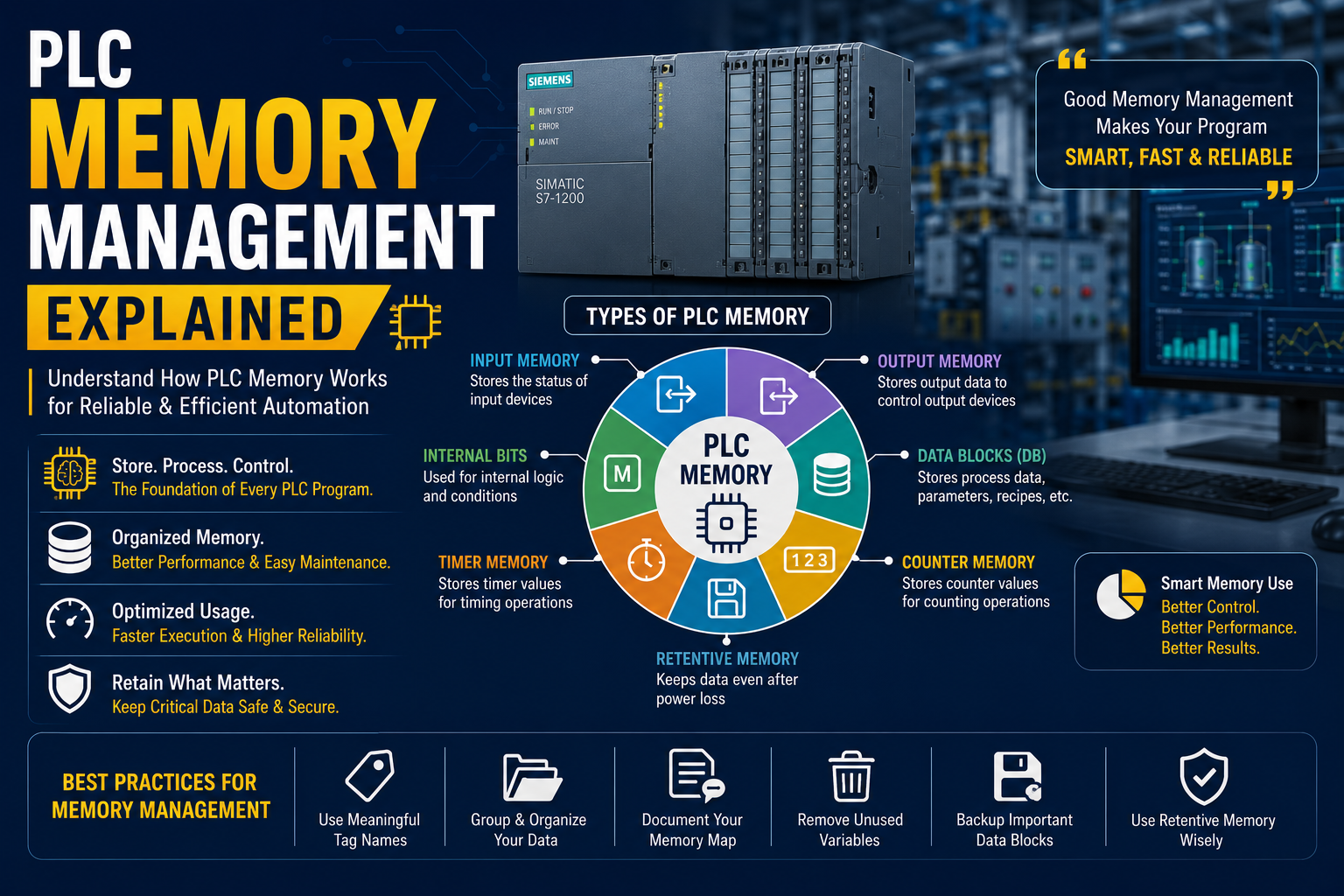
Introduction
Every PLC program depends on one critical resource that many beginners overlook - memory.
Whenever a sensor changes state, a timer starts counting, or a motor status is stored, the PLC uses its memory to process and retain that information.
Poor memory management can lead to:
- Difficult troubleshooting
- Slower program execution
- Wasted CPU resources
- Complicated maintenance
- Increased programming errors
On the other hand, a well-organized memory structure makes PLC programs easier to develop, debug, and expand.
In this guide, we'll explain how PLC memory works, the different types of memory available, and the best practices every automation engineer should follow.
What is PLC Memory?
PLC memory is the internal storage area where the controller stores:
- Program instructions
- Input and output states
- Internal variables
- Timer values
- Counter values
- Process data
- Configuration settings
Think of PLC memory as the controller's workspace. Every scan cycle, the CPU reads, updates, and stores information in memory to execute the automation process.
Why is Memory Management Important?
Proper memory management offers several benefits:
- Faster program execution
- Easier troubleshooting
- Better program readability
- Reduced programming mistakes
- Simplified future modifications
- Improved system reliability
As automation projects grow, organized memory becomes essential for long-term maintenance.
Types of PLC Memory
Most modern PLCs use several memory areas, each serving a different purpose.
1. Input Memory (Input Image Table)
Input memory stores the current status of all physical input devices connected to the PLC.
Examples include:
- Push buttons
- Limit switches
- Proximity sensors
- Float switches
- Emergency stop buttons
During every scan cycle, the PLC reads all physical inputs and copies their status into input memory.
The program always works with this stored image instead of reading hardware continuously.
2. Output Memory (Output Image Table)
Output memory stores the desired status of all output devices.
Examples include:
- Motors
- Solenoid valves
- Contactors
- Indicator lamps
- Buzzers
After executing the program, the PLC transfers the output memory values to the physical output modules.
3. Internal Memory Bits
Internal memory bits are software variables that do not correspond to physical inputs or outputs.
They are commonly used for:
- Internal logic
- Interlocks
- Process flags
- Sequence control
- Temporary conditions
For Siemens PLCs, these are often called M bits.
Example:
- Machine Running
- Auto Mode Active
- Cycle Complete
4. Data Blocks (DB)
Data Blocks are one of the most powerful memory areas in Siemens PLCs.
They are used to store:
- Recipes
- Production parameters
- Machine settings
- Analog values
- Operator setpoints
There are two common types:
Global Data Blocks
Accessible from anywhere in the program.
Used for:
- Shared parameters
- Production data
- Communication variables
Instance Data Blocks
Created automatically for Function Blocks (FBs).
Used to store data unique to each FB instance.
5. Timer Memory
Timers store timing information used for process control.
Common timer types include:
- ON Delay (TON)
- OFF Delay (TOF)
- Pulse Timer (TP)
Timers are used in applications such as:
- Conveyor delays
- Pump sequencing
- Motor startup
- Alarm delays
6. Counter Memory
Counters store numerical values that increase or decrease based on program logic.
Typical applications include:
- Product counting
- Batch processing
- Machine cycles
- Production quantity
Counters usually include:
- Current value
- Preset value
- Reset condition
7. Retentive Memory
Retentive memory keeps selected data even after the PLC loses power.
Typical examples include:
- Production totals
- Batch numbers
- Machine settings
- Operator parameters
- Energy consumption
Without retentive memory, these values would reset after every power failure.
8. Temporary Memory
Temporary memory stores data only while a function is being executed.
It is automatically cleared after execution.
Typical uses:
- Intermediate calculations
- Temporary variables
- Mathematical operations
Temporary variables reduce overall memory usage and improve program organization.
How PLC Memory Works During a Scan Cycle
During every scan cycle, the PLC performs the following sequence:
Step 1
Read all input signals into input memory.
Step 2
Execute the PLC program using stored memory values.
Step 3
Update output memory.
Step 4
Transfer output memory to physical output devices.
Step 5
Perform communication and diagnostic tasks.
This process repeats continuously while the PLC is running.
Common Memory Organization Methods
Professional programmers organize memory carefully.
Example:
| Memory Area | Purpose |
|---|---|
| Inputs | Sensors & switches |
| Outputs | Motors & valves |
| M Bits | Internal logic |
| DBs | Parameters & recipes |
| Timers | Delay operations |
| Counters | Production counting |
| Retentive Memory | Important stored values |
Proper organization simplifies maintenance and troubleshooting.
Common Memory Management Mistakes
Many beginners make these mistakes:
Using Random Memory Addresses
This makes programs difficult to understand.
No Comments
Without comments, troubleshooting becomes time-consuming.
Mixing Temporary and Permanent Data
Important production values should never be stored in temporary memory.
Excessive Use of Global Variables
Too many global variables reduce program readability.
Not Backing Up Data Blocks
Machine settings and recipes should always be backed up.
Best Practices for PLC Memory Management
Use Meaningful Tag Names
Instead of:
M0.1
Use:
Motor_Run_Command
Group Similar Variables
Organize tags by function:
- Motors
- Pumps
- Valves
- Sensors
- Alarms
Use Data Blocks for Parameters
Store configurable values in dedicated Data Blocks instead of hardcoding them.
Document Every Memory Area
Maintain a memory map showing:
- Address
- Tag name
- Description
- Function
This helps future maintenance engineers.
Avoid Unused Variables
Delete obsolete variables to reduce confusion.
Use Retentive Memory Carefully
Store only information that must survive a power cycle.
Too much retentive data can increase startup complexity.
Example Memory Structure
Imagine a conveyor system.
Inputs
- Start Button
- Stop Button
- Emergency Stop
- Product Sensor
Outputs
- Conveyor Motor
- Alarm Lamp
- Buzzer
Internal Bits
- Auto Mode
- Conveyor Running
- Fault Reset
Data Block
- Conveyor Speed
- Product Count
- Alarm Delay
Timers
- Motor Delay
- Alarm Delay
Counters
- Product Counter
- Shift Counter
This structure keeps the program organized and easy to maintain.
Benefits of Good PLC Memory Management
A well-designed memory structure provides:
- Easier troubleshooting
- Faster programming
- Better documentation
- Lower maintenance costs
- Improved reliability
- Easier future expansion
- Better team collaboration
Future of PLC Memory Management
Modern PLC platforms continue to evolve with:
- Larger memory capacity
- Optimized data structures
- Cloud synchronization
- Recipe management
- Advanced diagnostics
- Industrial IoT integration
These capabilities support smart factories and Industry 4.0 applications.
Conclusion
PLC memory management is one of the foundations of reliable industrial automation.
Understanding how inputs, outputs, internal bits, timers, counters, Data Blocks, and retentive memory work allows engineers to create cleaner, faster, and more maintainable PLC programs.
By following structured memory organization and industry best practices, automation engineers can reduce programming errors, simplify troubleshooting, and build scalable control systems that perform reliably for years.
Whether you're learning PLC programming or developing complex industrial automation projects, mastering memory management is a skill that will improve every program you create.
Frequently Asked Questions (FAQs)
1. What is PLC memory?
PLC memory is the storage area used to hold program instructions, variables, input/output states, timers, counters, and machine data.
2. What is the difference between Input Memory and Output Memory?
Input memory stores the current status of input devices, while output memory stores the commands that will be sent to output devices after program execution.
3. What are Data Blocks in Siemens PLC?
Data Blocks (DBs) store parameters, recipes, machine settings, production values, and other user-defined data. They can be global or linked to Function Blocks (Instance DBs).
4. What is retentive memory?
Retentive memory stores selected data even after power loss, making it ideal for production counts, recipes, and machine settings.
5. Why is proper PLC memory management important?
Good memory management improves program readability, simplifies troubleshooting, reduces maintenance time, and makes automation systems easier to expand and maintain.