
Generative AI has changed what organizations expect from their data infrastructure. Large language models cannot reason over private, constantly changing business data on their own - they need a system that can store meaning, not just records, and retrieve it in milliseconds.
That system is the AI-native database: a new category of data infrastructure built around embeddings, similarity search, and retrieval rather than exact-match queries alone.
This guide explains what AI-native databases are, how they differ from traditional databases, the architecture behind them, the leading players, and where each approach fits best - for engineers, architects, and business leaders planning their AI data strategy.
What Is a Traditional Database?
A traditional database (relational or NoSQL) is a system optimized for storing structured or semi-structured records and retrieving them through exact matches, ranges, or joins - for example, "find all orders placed after March 1st with status = shipped."
These systems power the transactional backbone of most software: order management, user accounts, inventory, and financial ledgers. They are built for consistency, integrity, and precise queries, not for understanding meaning or context.
Typical characteristics include:
- Structured schemas (tables, rows, columns) or defined document shapes
- Exact-match and range-based querying
- Strong transactional guarantees (ACID compliance)
- Mature tooling and decades of operational best practices
- Limited native understanding of unstructured content
What Is an AI-Native Database?
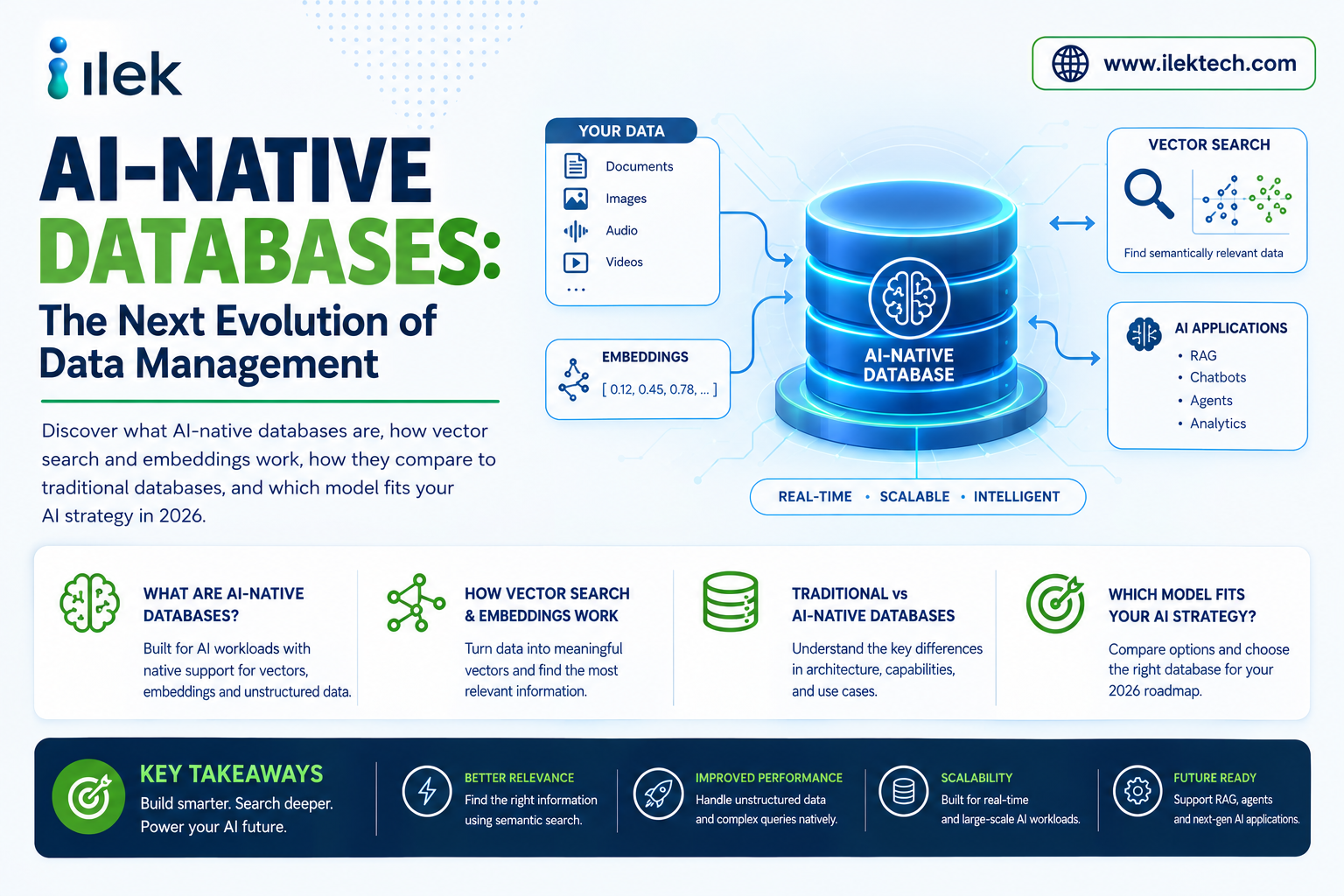
An AI-native database is a data system designed from the ground up - or substantially extended - to store, index, and search embeddings: numerical vector representations of text, images, audio, or code that capture semantic meaning.
Instead of matching exact values, an AI-native database answers "what is most similar to this?" using Approximate Nearest Neighbor (ANN) search. This is the foundation of Retrieval-Augmented Generation (RAG), semantic search, recommendation engines, and the persistent memory used by autonomous AI agents.
Typical characteristics include:
- Native support for high-dimensional vector storage and indexing
- Approximate Nearest Neighbor (ANN) algorithms such as HNSW or IVF
- Hybrid search combining vectors, keywords, and metadata filters
- Deep integration with embedding models and LLM frameworks
- Elastic, cloud-native scaling for high query throughput
AI-Native vs Traditional Database Comparison
| Feature | Traditional Database | AI-Native Database |
| Core Query Model | Exact match / range / joins | Similarity / nearest-neighbor search |
| Data Representation | Rows, columns, documents | High-dimensional vectors (embeddings) |
| Primary Use Case | Transactions, records, reporting | RAG, semantic search, agent memory |
| Indexing Approach | B-tree, hash, inverted index | HNSW, IVF, ANN-based indexes |
| Unstructured Data | Limited or bolt-on support | Native, first-class support |
| Query Result | Exact rows matching criteria | Ranked results by semantic similarity |
| Integration with LLMs | Minimal, requires middleware | Deep, purpose-built integration |
| Scaling Pattern | Vertical or sharded scaling | Cloud-native, elastic vector indexing |
How AI-Native Databases Work
Most AI-native database workflows follow the same basic pipeline, commonly known as Retrieval-Augmented Generation (RAG):
- Raw data (documents, code, images, audio) is collected from source systems.
- An embedding model converts that content into numerical vectors representing its meaning.
- Vectors are stored in an index built for Approximate Nearest Neighbor search, such as HNSW or IVF.
- At query time, the system retrieves the most semantically relevant vectors, often combined with keyword and metadata filters.
- Retrieved context is passed to an LLM or AI agent, which generates a grounded, up-to-date response.
Two Architectural Camps: Purpose-Built vs Vector-Extended
The market has split into two philosophies. Purpose-built vector databases such as Pinecone, Weaviate, Qdrant, and Milvus were designed from the ground up for vector operations. Vector-extended general-purpose databases - most notably PostgreSQL with pgvector and pgvectorscale - add vector search to a database teams already run.
| Factor | Purpose-Built Vector DB | Vector-Extended DB (e.g., Postgres) |
| Raw Vector Performance | Often highest at extreme scale | Strong at moderate to large scale |
| Operational Overhead | New system to learn and run | Reuses existing infrastructure |
| Hybrid Search Features | Advanced, purpose-built | Improving rapidly via extensions |
| Best Fit | High-scale, specialized workloads | Teams standardizing on one database |
Market Growth and Investment
Capital is flowing rapidly into AI-native data infrastructure. The global vector database market was valued at roughly $3.73 billion in 2026 and is projected to reach $8.71 billion by 2030, growing at a compound annual growth rate (CAGR) of approximately 23.6%.
Funding activity reflects this momentum: Supabase closed a $500 million Series F in June 2026 at a $10.5 billion valuation, reporting a 600% year-over-year increase in databases created on its platform, with AI coding agents now deploying the majority of them. Qdrant raised $50 million in March 2026, and LanceDB raised $30 million the prior year.
Key Players in the AI-Native Database Landscape
| Database | Type | Best For |
| pgvector / Postgres | Vector-extended relational | Teams already running Postgres; moderate-scale production AI |
| Pinecone | Managed, purpose-built | Fully managed production deployments |
| Qdrant | Open-source, purpose-built | Advanced metadata filtering; legal and financial compliance tools |
| Weaviate | Open-source + managed | Native hybrid search (BM25 + vectors + filters) |
| Milvus | Open-source, purpose-built | Large-scale, high-throughput vector workloads |
| Chroma / Faiss | Lightweight, open-source | Prototyping and smaller-scale applications |
Performance Comparison
| Performance Factor | Traditional Database | AI-Native Database |
| Exact-Match Queries | Excellent | Not the primary use case |
| Semantic / Similarity Search | Not supported natively | Excellent |
| High-Dimensional Data at Scale | Limited | Purpose-built for this |
| Query Latency for RAG | High without extensions | Optimized (sub-second at scale) |
Advantages of AI-Native Databases
- Native semantic and similarity search
- Purpose-built for RAG and LLM-grounded applications
- Supports persistent memory for autonomous AI agents
- Hybrid search combining keywords, vectors, and metadata
- Handles unstructured data (text, images, audio) natively
- Rapidly improving ecosystem and tooling
Challenges of AI-Native Databases
- Newer category with less mature compliance tooling
- Cost can scale quickly with high query volume
- Vendor benchmarks vary widely and require independent validation
- Requires an embedding model and pipeline to maintain
- Edge and offline / air-gapped deployment support is still limited
- Architecture choices (purpose-built vs. extended) are still evolving
Best Use Cases
| Scenario | Recommended Approach |
| RAG-powered chatbot / support agent | AI-Native Database |
| Enterprise knowledge search | AI-Native Database |
| Autonomous AI agent memory | AI-Native Database |
| Financial transaction ledger | Traditional Database |
| Recommendation engine | AI-Native Database |
| User authentication / accounts | Traditional Database |
| Fraud / anomaly detection | AI-Native Database |
| Inventory management | Traditional Database |
| Multimodal (image + text) search | AI-Native Database |
| Regulatory / financial reporting | Traditional Database |
When Should You Choose an AI-Native Database?
An AI-native database is the right choice if your organization needs:
- Semantic search across large volumes of unstructured content
- Retrieval-Augmented Generation for LLM applications
- Persistent, retrievable memory for AI agents
- Recommendation or personalization at scale
- Multimodal search across text, images, or audio
When Should You Stick with a Traditional Database?
A traditional database remains the better fit if you need:
- Strict transactional consistency (ACID compliance)
- Precise, exact-match reporting and auditing
- Mature, well-understood compliance and governance tooling
- Structured business records with well-defined schemas
Can You Use Both?
Absolutely.
Most production systems today combine both models. Structured business data - orders, accounts, transactions - stays in a traditional database, while unstructured content used for search, retrieval, or agent memory lives in an AI-native store.
For example:
- Customer records and billing remain in a relational database.
- Support documents and product manuals are embedded for RAG-based chat.
- An AI agent's working memory is stored as vectors for fast semantic recall.
- Postgres with pgvector lets teams run both models inside a single system.
This hybrid approach lets organizations apply the right retrieval model to each workload without re-architecting their entire data stack.
Final Comparison
| Category | Better Choice |
| Exact-Match Transactions | Traditional Database |
| Semantic / Similarity Search | AI-Native Database |
| Regulatory Maturity | Traditional Database |
| RAG & LLM Grounding | AI-Native Database |
| Unstructured Data Handling | AI-Native Database |
| Operational Familiarity | Traditional Database |
| AI Agent Memory | AI-Native Daabase |
| Cost Predictability at Scale | Traditional Database |
Conclusion
There is no universal winner in the AI-native vs traditional database debate. The right choice depends on your workload, the type of data involved, your compliance requirements, and how central generative AI is to your product.
AI-native databases excel when semantic understanding, retrieval, and agent memory are top priorities. Traditional databases remain essential for transactional integrity, structured reporting, and mature compliance.
Most modern organizations are converging on a hybrid strategy - pairing a traditional database for structured records with an AI-native layer (often a vector-extended database like Postgres with pgvector) for retrieval and generative AI workloads.
Frequently Asked Questions
Is an AI-native database a replacement for my existing database?
Usually not. Most organizations run both side by side, or extend their existing database with vector capabilities, rather than replacing it outright.
Do I need a separate vector database, or can Postgres handle it?
For many production workloads, Postgres with pgvector or pgvectorscale is sufficient and reduces operational overhead. Extremely high-scale or specialized filtering needs may still favor a purpose-built vector database.
What is the difference between RAG and fine-tuning?
RAG retrieves relevant information at query time and feeds it to the model as context, keeping data current without retraining. Fine-tuning changes the model's underlying weights and is better suited to teaching style or behavior rather than fresh facts.
Are vector embeddings a compliance risk?
They can be, especially under regulations like the EU AI Act, GDPR, and HIPAA. Embeddings can encode sensitive information, so they require the same governance, access control, and encryption discipline as the source data.
Which industries are adopting AI-native databases fastest?
Technology, financial services, and healthcare are leading adopters, driven by customer support automation, semantic search, fraud detection, and the broader shift toward agentic AI systems that need persistent memory.