Introduction
Modern industrial machines are becoming more complex.
A single machine may include hundreds of sensors, valves, motors, drives, switches, and other field devices. Traditionally, these devices were connected directly to I/O modules located inside the main PLC control panel.
As the number of field devices increases, this centralized architecture can create a large amount of control wiring between the machine and the panel.
This is where Distributed I/O can significantly improve machine architecture.
Instead of bringing every field signal back to one central control panel, distributed I/O stations can be installed closer to the machine or process. These remote I/O stations communicate with the PLC through an industrial communication network.
The result can be a cleaner architecture with:
- Reduced control wiring
- Smaller panel requirements
- Easier installation
- Better diagnostics
- Simplified maintenance
- Easier machine expansion
In this article, we will understand what distributed I/O is, how it works, its advantages, limitations, and when it should be used in industrial automation.
What is Distributed I/O?
Distributed I/O is an industrial automation architecture where input and output modules are physically distributed across different locations instead of being installed entirely inside the main PLC panel.
A typical architecture looks like:
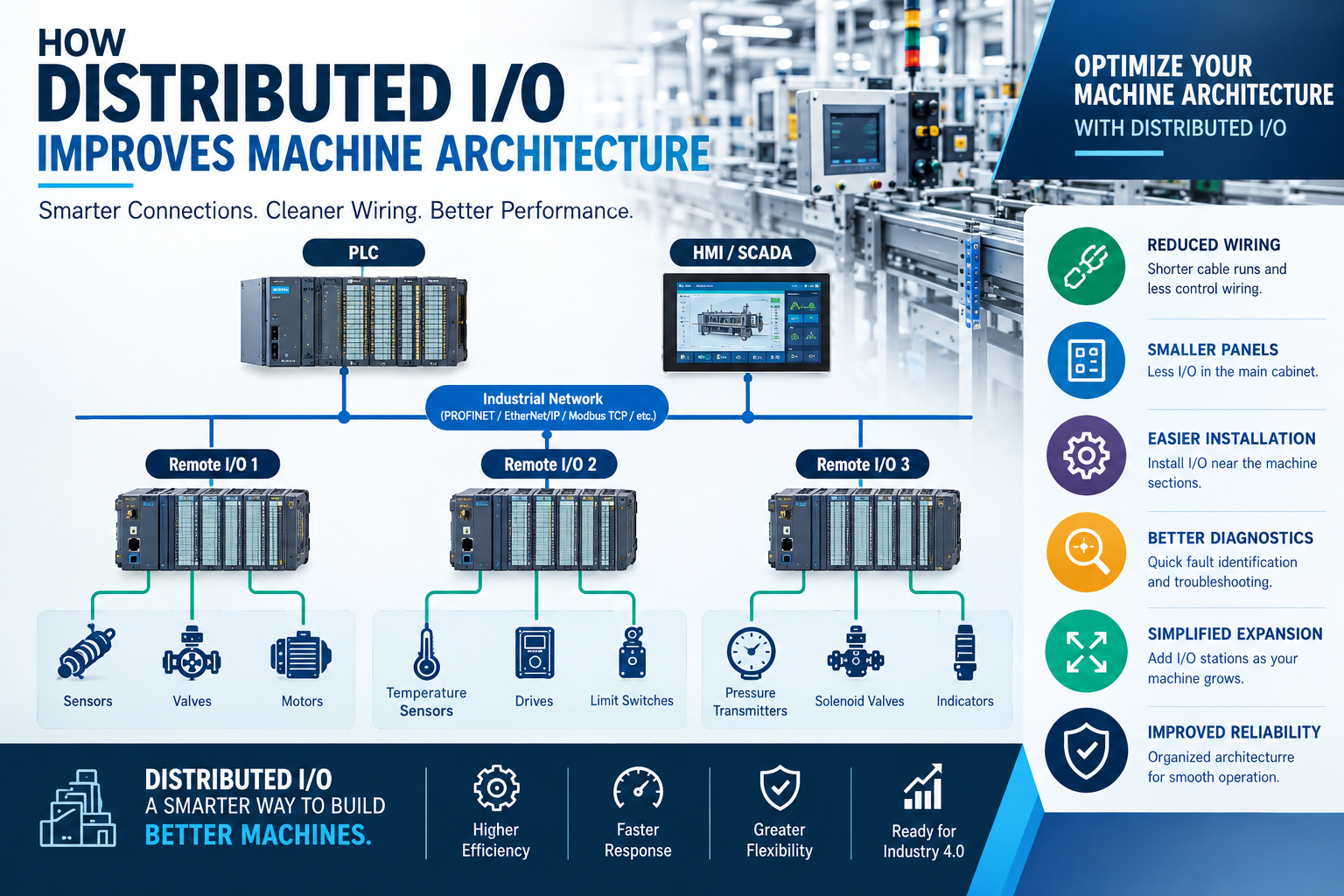
Sensors / Actuators → Remote I/O → Industrial Network → PLC → HMI / SCADA
The remote I/O station collects signals from field devices and exchanges the data with the PLC over an industrial communication network.
Depending on the automation platform, technologies such as:
- PROFINET
- EtherNet/IP
- Modbus TCP
- PROFIBUS
- EtherCAT
may be used for communication.
The exact protocol depends on the PLC, remote I/O platform, machine requirements, and system architecture.
Centralized I/O vs Distributed I/O
To understand the advantage of distributed I/O, first consider a traditional centralized architecture.
Centralized I/O Architecture
In a centralized system:
Field Devices → Main Control Panel → PLC I/O
For example, if a machine has sensors distributed across several meters of machine structure, individual wires may need to travel from those sensors back to the main panel.
As the machine becomes larger, this can result in:
- Large cable bundles
- More terminals
- Larger cable ducts
- More wiring work
- More difficult troubleshooting
Distributed I/O Architecture
With distributed I/O:
Field Devices → Local Remote I/O → Industrial Network → PLC
The remote I/O station is installed close to the field devices.
Only the communication network and required power connections need to travel between the remote station and the main control architecture.
This can significantly simplify the machine wiring structure.
How Distributed I/O Works
A distributed I/O system generally contains four major elements.
1. PLC or Controller
The PLC remains responsible for executing the control program.
It receives process data from remote I/O stations and sends output commands to them.
2. Remote I/O Station
The remote I/O station contains modules for connecting field devices.
Depending on the application, these may include:
- Digital Input
- Digital Output
- Analog Input
- Analog Output
- Temperature modules
- Specialty modules
3. Industrial Network
The PLC communicates with remote I/O through an industrial network.
For example:
PLC → Industrial Ethernet Switch → Remote I/O Station
The network carries input and output data between the controller and the distributed I/O stations.
4. Field Devices
Field devices are connected locally to the remote I/O station.
Examples include:
- Proximity sensors
- Photoelectric sensors
- Limit switches
- Solenoid valves
- Pressure transmitters
- Temperature transmitters
- Motor control signals
Example of Distributed I/O in a Machine
Consider a large packaging machine with three major sections:
- Feeding section
- Processing section
- Discharge section
With centralized I/O, signals from all three sections may need to return to one main control panel.
This can create a large amount of wiring.
With distributed I/O, separate remote I/O stations can be installed near each machine section.
For example:
Feeding Section → Remote I/O 1
Processing Section → Remote I/O 2
Discharge Section → Remote I/O 3
All three stations communicate with the central PLC.
This creates a much more organized machine architecture.
How Distributed I/O Reduces Wiring
One of the biggest advantages of distributed I/O is reduced field wiring.
In a centralized system, every signal may require an individual cable path back to the control panel.
With distributed I/O, field devices are terminated near their physical location.
The remote I/O then communicates with the PLC through a network connection.
This changes the architecture from:
Many individual long signal cables
to:
Local field wiring + industrial network
This can make large machines significantly easier to build and maintain.
Benefits of Distributed I/O
1. Reduced Control Wiring
Remote I/O reduces the distance that individual field signals need to travel.
This can reduce:
- Cable length
- Terminal requirements
- Wiring effort
- Panel congestion
2. Cleaner Machine Architecture
Distributed I/O allows the control architecture to follow the physical structure of the machine.
Instead of forcing all field wiring toward one panel, I/O can be positioned where it is actually required.
This produces a cleaner and more structured installation.
3. Smaller Control Panels
Because many I/O modules can be moved away from the main control panel, the central panel may require less space for I/O termination and associated wiring.
This can help engineers optimize panel layout.
However, panel size should always be determined based on the complete electrical and automation design—not only the I/O count.
4. Easier Installation
During machine assembly, remote I/O stations can be installed near individual machine sections.
This can simplify:
- Cable routing
- Termination
- Machine assembly
- Commissioning
5. Easier Troubleshooting
Many modern distributed I/O systems provide diagnostic information.
Engineers can identify problems such as:
- Communication faults
- Module faults
- Short circuits
- Channel errors
- Missing field signals
Depending on the platform, diagnostics may also be visible through the PLC engineering software or HMI/SCADA system.
6. Better System Diagnostics
Modern remote I/O platforms can provide detailed diagnostic information.
For example, an engineer may be able to determine whether the problem is related to:
- A particular I/O module
- A specific channel
- Network communication
- Power supply
- Field wiring
This reduces troubleshooting time.
7. Easier Machine Expansion
Distributed I/O can make future expansion easier.
Suppose a machine initially requires one remote I/O station.
Later, an additional machine section is added.
A new remote I/O station may be added to the network, subject to the PLC, network, power, and system architecture limitations.
This can be easier than redesigning a large centralized wiring system.
8. Better Modularity
Distributed I/O works particularly well with modular machine designs.
A machine can be divided into functional sections such as:
- Infeed
- Processing
- Inspection
- Packaging
- Outfeed
Each section can have its own local I/O architecture.
This makes the overall system easier to understand and maintain.
Distributed I/O vs Centralized I/O
| Feature | Centralized I/O | Distributed I/O |
|---|---|---|
| I/O location | Mainly in central panel | Distributed near machine/process |
| Field wiring | Higher for large machines | Generally reduced |
| Panel wiring | More concentrated | More distributed |
| Machine expansion | Can require additional wiring | Often easier to extend |
| Diagnostics | Depends on hardware | Often provides detailed remote diagnostics |
| Installation | Simple for small machines | Very useful for larger machines |
| Network dependency | Lower | Higher |
| Architecture | Centralized | Distributed |
Neither architecture is universally better.
The correct choice depends on machine size, I/O distribution, environmental conditions, network requirements, maintenance strategy, and project budget.
Common Mistakes When Designing Distributed I/O
Poor Network Planning
Adding remote I/O without properly planning the network can create communication problems.
Insufficient Power Planning
Remote I/O stations need reliable power distribution.
No Spare Capacity
A system with no spare I/O or network capacity can become difficult to expand.
Ignoring Environmental Conditions
Installing unsuitable I/O hardware near harsh machine environments can result in failures.
Poor Documentation
Every remote I/O station, module, channel, and network connection should be properly documented.
Best Practices for Distributed I/O Design
Follow these practices when designing a distributed I/O system:
- Map I/O according to machine sections.
- Keep remote I/O close to field devices where practical.
- Select the communication protocol based on system requirements.
- Plan network topology before installation.
- Calculate power requirements carefully.
- Provide appropriate protection and grounding.
- Keep spare I/O capacity where practical.
- Label cables and I/O channels clearly.
- Maintain updated electrical drawings.
- Configure network and device diagnostics.
- Test communication before machine commissioning.
- Document the complete architecture for future maintenance.
Future of Distributed I/O
Industrial automation is moving toward increasingly connected and modular architectures.
Future systems will increasingly combine:
- Distributed I/O
- Industrial Ethernet
- Edge devices
- Industrial IoT
- Cloud connectivity
- Predictive diagnostics
- Remote monitoring
This will allow field-level data to become more accessible throughout the automation system.
Distributed architectures are therefore an important part of modern machine design and Industry 4.0.
Conclusion
Distributed I/O can significantly improve the architecture of modern industrial machines by moving I/O closer to the field devices and reducing the need for extensive centralized control wiring.
The major advantages include:
- Reduced wiring
- Cleaner machine architecture
- Easier installation
- Better diagnostics
- Improved modularity
- Easier expansion
- Simplified maintenance
However, distributed I/O is not automatically the right solution for every machine. Engineers should evaluate machine size, I/O distribution, network requirements, environmental conditions, maintenance needs, and future expansion before selecting the architecture.
When properly designed, distributed I/O provides a scalable and organized foundation for modern PLC-based industrial automation systems.
Frequently Asked Questions (FAQs)
1. What is distributed I/O in PLC systems?
Distributed I/O is an architecture where I/O modules are located at different points around a machine or plant and communicate with the central PLC through an industrial network.
2. What is the difference between remote I/O and distributed I/O?
The terms are often used interchangeably in industrial automation. Both generally refer to I/O located away from the main controller and connected through a communication network. The exact terminology can vary between manufacturers and systems.
3. Does distributed I/O reduce wiring?
Yes. Distributed I/O can significantly reduce long individual control-wire runs by placing I/O closer to field devices and using a communication network to exchange data with the PLC.
4. Is distributed I/O better than centralized I/O?
Not always. Distributed I/O is particularly beneficial for large or modular machines, while centralized I/O can be simpler and more economical for smaller machines.
5. Which communication protocols are used for distributed I/O?
Common technologies include PROFINET, EtherNet/IP, Modbus TCP, PROFIBUS, and EtherCAT. The appropriate choice depends on the PLC, I/O hardware, performance requirements, and overall system architecture.
6. Can distributed I/O be used with Siemens PLCs?
Yes. Siemens PLC systems can use distributed I/O architectures, including ET 200 families connected through supported communication technologies such as PROFINET.
7. Does distributed I/O improve troubleshooting?
It can. Modern remote I/O systems often provide module and channel diagnostics that help engineers identify communication, module, and field-signal problems more quickly.
8. Is distributed I/O suitable for Industry 4.0?
Yes. Distributed I/O combined with industrial networking provides a foundation for connected, modular automation architectures and can support higher-level systems such as SCADA, MES, and Industrial IoT platforms.