

Introduction
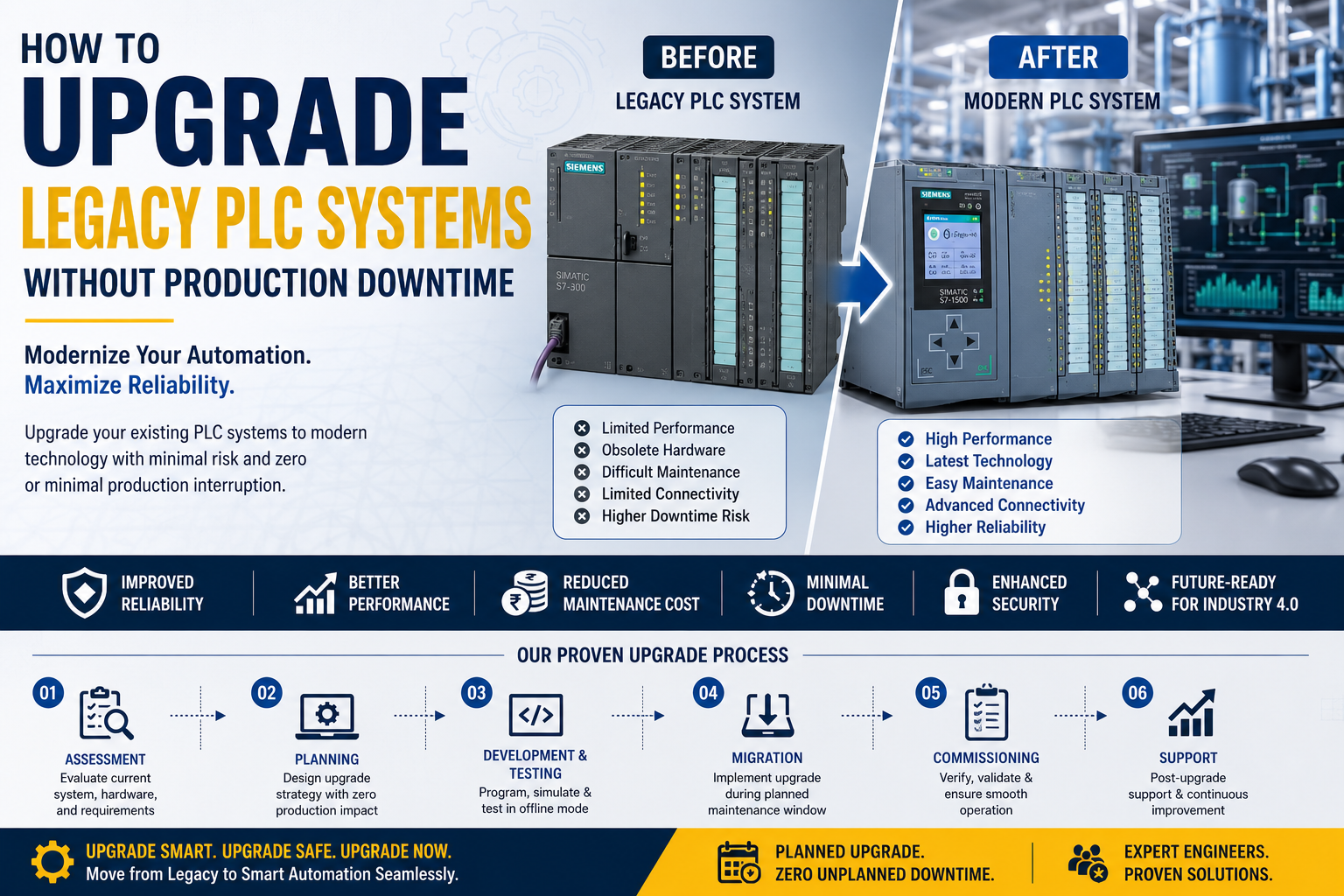
Many manufacturing facilities across India continue to operate machines equipped with PLC systems that were installed years or even decades ago. While these legacy systems may still function, they often present significant challenges, including limited spare parts availability, outdated software, slower processing speeds, cybersecurity risks, and difficulties integrating with modern technologies.
One of the biggest concerns for factory owners and production managers is:
“How can we upgrade our PLC system without stopping production?”
Production downtime can result in delayed deliveries, reduced output, increased operational costs, and dissatisfied customers.
The good news is that with proper planning and engineering, legacy PLC systems can be upgraded with minimal disruption.
This guide explains the complete process of modernizing legacy PLC systems while maintaining production continuity.
What Is a Legacy PLC System?
A legacy PLC system refers to an older generation programmable logic controller that has become outdated due to technological advancements or discontinued manufacturer support.
Common characteristics include:
- Obsolete hardware
- Limited memory and processing power
- Unsupported programming software
- Difficult spare part availability
- Limited communication capabilities
- No Industry 4.0 compatibility
Many industries still operate legacy PLCs because replacing them appears risky or expensive.
Why Should You Upgrade a Legacy PLC?
Keeping an outdated control system can create several long-term problems.
Common Challenges
- Frequent machine breakdowns
- Difficult troubleshooting
- Expensive maintenance
- Spare parts becoming unavailable
- Poor communication with modern equipment
- Increased cybersecurity risks
- Lack of remote monitoring
Modern PLC platforms provide improved reliability, better diagnostics, faster communication, and easier future expansion.
Challenges During PLC Migration
Replacing a PLC is not simply swapping one controller for another.
Several factors must be considered:
- Existing wiring
- Input and output compatibility
- Program conversion
- Communication protocols
- HMI and SCADA integration
- Safety systems
- Production schedules
Without proper planning, migration can lead to unexpected downtime.
Step 1: Assess the Existing Automation System
Before beginning any upgrade, perform a complete system assessment.
Document:
- PLC model
- I/O configuration
- Communication network
- HMI system
- SCADA software
- VFDs and servo drives
- Sensors and actuators
- Electrical drawings
- PLC program backup
This assessment forms the foundation of a successful migration plan.
Step 2: Identify Critical Production Processes
Not every machine has the same impact on production.
Identify:
- Critical production lines
- Non-critical equipment
- Standby machines
- Maintenance windows
This helps prioritize upgrades without affecting overall plant output.
Step 3: Select the Right Modern PLC Platform
Choose a PLC that supports:
- Future expansion
- Industrial networking
- Remote diagnostics
- Industry 4.0 integration
- Long-term manufacturer support
Consider factors such as:
- Processing speed
- Memory capacity
- Communication options
- Availability of local technical support
- Compatibility with existing systems
The best PLC is not always the most expensive—it is the one that fits your operational requirements and long-term goals.
Step 4: Create a Complete Backup
Before modifying anything, back up every important system.
Include:
- PLC program
- HMI application
- SCADA project
- Drive parameters
- Network configuration
- Alarm database
- Electrical drawings
Maintain multiple backup copies in secure locations.
Step 5: Develop the New PLC Program Offline
Instead of programming during production, develop the entire application offline.
This allows engineers to:
- Review logic
- Test sequences
- Verify safety interlocks
- Optimize scan time
- Validate communication
Offline development significantly reduces commissioning time.
Step 6: Simulate and Test the Program
Simulation is one of the safest ways to identify programming issues before installation.
Testing should include:
- Machine sequences
- Alarm functions
- Interlocks
- Communication
- Analog scaling
- Emergency stop logic
Resolving issues before installation minimizes production interruptions.
Step 7: Schedule the Upgrade During Planned Shutdown
Avoid upgrading during peak production.
Ideal opportunities include:
- Weekly maintenance
- Planned shutdowns
- Plant holidays
- Annual maintenance schedules
Proper scheduling reduces business impact.
Step 8: Upgrade One Machine at a Time
For large facilities, avoid replacing every PLC simultaneously.
A phased migration provides:
- Lower operational risk
- Easier troubleshooting
- Better production continuity
- Faster recovery if problems occur
Many successful modernization projects follow this approach.
Step 9: Validate Communication Systems
Modern PLCs often communicate using:
- Profinet
- Modbus TCP
- Ethernet/IP
- OPC UA
Verify communication with:
- HMI
- SCADA
- VFDs
- Remote I/O
- Industrial gateways
Reliable communication is essential before production resumes.
Step 10: Perform Site Acceptance Testing (SAT)
Before handing the system over to production, conduct a complete Site Acceptance Test.
Verify:
- All inputs
- All outputs
- Safety functions
- Alarm operation
- HMI screens
- SCADA monitoring
- Communication stability
- Production sequences
Testing helps identify issues before operators begin normal production.
Common Mistakes to Avoid
Many modernization projects encounter problems because of poor planning.
Avoid these mistakes:
- No PLC backup
- Ignoring communication compatibility
- Upgrading without simulation
- Poor documentation
- Insufficient operator training
- Incomplete testing
- Rushing commissioning
Careful preparation saves significant time and cost.
Benefits of Upgrading Legacy PLC Systems
Modernization provides numerous long-term advantages.
These include:
- Improved machine reliability
- Faster processing speed
- Better diagnostics
- Reduced maintenance costs
- Easier troubleshooting
- Improved cybersecurity
- Remote monitoring capability
- Simplified future expansion
- Better integration with SCADA and MES systems
Modern PLC platforms also support smart manufacturing initiatives.
Best Practices for Successful PLC Modernization
For a successful upgrade:
- Plan every stage carefully.
- Keep detailed documentation.
- Test offline whenever possible.
- Maintain complete backups.
- Upgrade in phases.
- Train operators and maintenance personnel.
- Verify every communication link.
- Follow electrical and safety standards.
- Prepare a rollback plan in case of unexpected issues.
Future of Legacy PLC Modernization
Industrial automation is rapidly evolving.
Modern control systems increasingly support:
- Industrial IoT
- Cloud connectivity
- AI-based diagnostics
- Predictive maintenance
- Digital twins
- Remote engineering
- Advanced cybersecurity
Upgrading legacy PLC systems prepares factories for these future technologies while extending the life of production assets.
Conclusion
Legacy PLC systems have served industries reliably for many years, but aging hardware and limited functionality can eventually affect productivity, maintenance, and business growth.
A well-planned modernization project allows industries to upgrade their automation systems with minimal production disruption.
By following a structured migration process—assessing existing systems, creating backups, developing programs offline, validating communication, and performing thorough testing—manufacturers can significantly reduce risk and ensure a smooth transition.
Investing in a modern PLC platform not only improves reliability and efficiency today but also prepares your factory for the connected, data-driven future of Industry 4.0.
Frequently Asked Questions
1. What is a legacy PLC system?
A legacy PLC is an older programmable logic controller that has become outdated due to limited support, obsolete hardware, or lack of compatibility with modern industrial technologies.
2. Can a PLC be upgraded without stopping production?
Yes. With careful planning, phased implementation, offline programming, and testing during scheduled maintenance windows, downtime can be minimized.
3. What is the biggest challenge during PLC migration?
The biggest challenges are maintaining production continuity, ensuring communication compatibility, and thoroughly testing the new system before commissioning.
4. Should the HMI and SCADA system also be upgraded?
Not always. If they are compatible with the new PLC, they may continue to be used. However, many modernization projects also update visualization systems to improve functionality and cybersecurity.
5. How often should industries modernize their PLC systems?
Rather than following a fixed timeline, industries should evaluate system performance, spare part availability, manufacturer support, cybersecurity requirements, and future expansion plans.